CALM Studio
CALM Studio is a visual architecture editor for CALM. You draw system diagrams on a canvas and get valid, machine-readable CALM 1.2 JSON automatically — or import existing CALM JSON and get an editable diagram. Every node you draw corresponds to a typed, validated CALM element, and every connection is a typed relationship, so the architecture stays the single source of truth instead of drifting away from the systems it describes.
Key Features
- Visual canvas editor — Drag-and-drop nodes and relationships with a rich palette of architecture building blocks
- Bidirectional sync — Canvas and CALM JSON stay in sync; edit either and the other updates instantly
- Extension packs — Built-in support for AWS, Azure, GCP, Kubernetes, FluxNova, and AI services; write custom packs in TypeScript
- MCP server — Model Context Protocol tools let AI assistants create and query architectures via natural language
- AIGF governance — Integrated AI Governance Framework controls with CALM 1.2 compliance validation
- Template picker — Start from curated architecture templates instead of a blank canvas
Running CALM Studio
CALM Studio runs as a local dev server from the architecture-as-code monorepo. It requires Node.js 22 or later.
- Start the dev server from the repository root:
npm run dev --workspace=@calmstudio/studio
- Open CALM Studio at http://localhost:5173.
The Interface
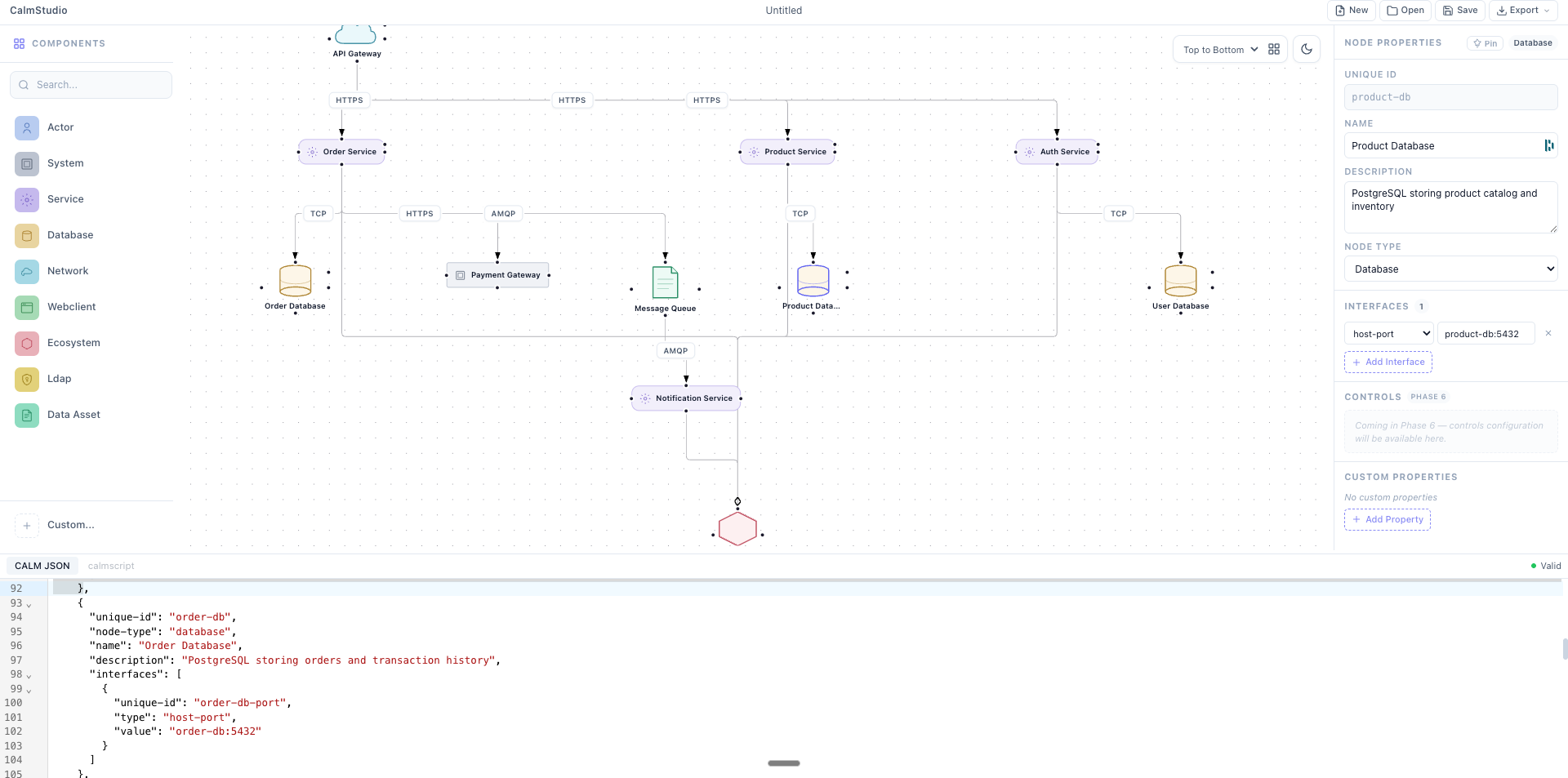
CALM Studio has five main areas:
| Area | Location | Purpose |
|---|---|---|
| Node palette | Left sidebar | Drag node types onto the canvas |
| Canvas | Centre | Visual diagram workspace |
| CALM JSON editor | Right panel | Raw CALM 1.2 JSON (bidirectional sync) |
| Properties panel | Right panel (context) | Edit selected node or relationship properties |
| Toolbar | Top | File, layout, view, and export actions |
Canvas Features
Drag-and-Drop Editing
The canvas is built on Svelte Flow (the Svelte port of React Flow). You can:
- Drag nodes from the palette to create them
- Move nodes by dragging
- Resize container nodes (ecosystem, network, VPC, etc.) by dragging corners
- Select multiple nodes with a lasso drag or Shift+click
- Zoom and pan with scroll wheel or trackpad gestures
- Double-click a node to open inline label editing
Bidirectional Sync
Every edit on the canvas is immediately reflected in the CALM JSON editor, and vice versa. This bidirectional sync means:
- Visual designers work in the canvas
- Engineers work in the JSON editor
- Both views are always in sync — there is no "save" step between them
The sync is powered by Svelte 5 runes: the CALM document is a single reactive store, and both the canvas and the JSON editor are views over it.
Properties Panel
Clicking a node or relationship opens the Properties panel. You can edit:
- Name and description
- Node type (changes the visual badge and CALM type field)
- Interfaces (URL endpoints, host-port pairs, container images, port numbers)
- Controls (add, edit, or remove security and compliance requirements, shown as badges on the node)
- Custom metadata fields
Extension Packs
CALM Studio ships 7 built-in extension packs, giving you 60+ additional node types beyond the 9 CALM core types:
| Pack | Node types | Examples |
|---|---|---|
| CALM Core | 9 | Actor, Service, Database, Network |
| AWS | 33 | Lambda, EC2, S3, DynamoDB, VPC, EKS, RDS, CloudFront, SQS |
| GCP | ~20 | Cloud Run, BigQuery, Pub/Sub, GKE, Cloud SQL |
| Azure | ~20 | App Service, Cosmos DB, Service Bus, AKS, Blob Storage |
| Kubernetes | ~15 | Pod, Deployment, Service, Ingress, ConfigMap, Namespace |
| AI/Agentic | ~10 | LLM, AI Agent, Vector Store, Tool, MCP Server |
| FluxNova | ~10 | FluxNova Engine, Connector, Workflow, Topic |
You can also create custom packs in TypeScript to add your own node types.
Governance: AIGF Scoring
CALM Studio integrates the FINOS AI Governance Framework (AIGF) for AI system architectures. When your diagram contains AI nodes (LLM, AI Agent, Vector Store, etc.), CALM Studio can:
- Score your architecture against 23 AIGF risk categories
- Surface 23 corresponding mitigations from the AIGF catalogue
- Show a governance scorecard in the sidebar
- Suggest controls to attach to AI nodes
Governance scoring is opt-in — use the Governance panel to trigger a scan.
Auto-Layout
CALM Studio uses ELK.js for automatic diagram layout. Three presets are available:
| Preset | Algorithm | Best for |
|---|---|---|
| Hierarchical LR | ELK Layered, left-to-right | Service dependency diagrams |
| Hierarchical TB | ELK Layered, top-to-bottom | Traditional architecture diagrams |
| Force-directed | ELK Force | Exploratory diagrams with many nodes |
Auto-layout respects CALM containment relationships — ecosystem and network containers are laid out with their children inside them. Trigger re-layout from Diagram → Auto-layout in the toolbar.
Import and Export
| Format | Import | Export |
|---|---|---|
CALM JSON (.json, .calm.json) | Yes | Yes |
| SVG | No | Yes |
| PNG | No | Yes |
Import a CALM JSON file to start from an existing architecture (e.g., one generated by the MCP server or CALM CLI). Export lets you save the canonical CALM JSON, or render the diagram as a PNG or SVG for documentation.
MCP Server Integration
CALM Studio ships a standalone MCP server (@calmstudio/mcp) that lets AI tools like Claude Code and GitHub Copilot create and modify CALM architectures programmatically. The server exposes 20 tools covering node CRUD, relationship management, rendering, and validation.
Recommended workflow
Always call read_calm_guide before creating nodes or relationships. It returns the full node-type vocabulary and relationship forms that the other tools enforce.
1. read_calm_guide()                        ← node types, relationship forms, usage tips
2. read_calm_guide(topic="arb-conversion")  ← AI architecture mapping table (optional)
3. create_architecture(file, nodes, relationships)
4. validate_architecture(file)              ← fix errors before continuing
5. finalize_architecture(file)              ← validates + attaches AIGF if AI nodes present
6. export_calm(file, destination)
Relationship form — nested object, not a string
relationship-type is an object keyed by variant. This is enforced by the CALM 1.2 schema and by validate_architecture. The flat string form ("relationship-type": "connects") is invalid and will be rejected.
connects — point-to-point communication:
{
  "unique-id": "api-to-db",
  "relationship-type": {
    "connects": {
      "source": { "node": "api-service" },
      "destination": { "node": "postgres-db" }
    }
  },
  "protocol": "JDBC"
}
composed-of — structural containment:
{
  "unique-id": "platform-composed-of-services",
  "relationship-type": {
    "composed-of": {
      "container": "platform",
      "nodes": ["auth-service", "api-service"]
    }
  }
}
interacts — actor to system:
{
  "unique-id": "user-interacts-app",
  "relationship-type": {
    "interacts": {
      "actor": "end-user",
      "nodes": ["web-frontend"]
    }
  }
}
deployed-in — deployment containment:
{
  "unique-id": "service-in-cluster",
  "relationship-type": {
    "deployed-in": {
      "container": "k8s-cluster",
      "nodes": ["api-service"]
    }
  }
}
Common mistakes
| Mistake | Fix |
|---|---|
"relationship-type": "connects" (string) | Use nested object: { "connects": { "source": ..., "destination": ... } } |
"source": "node-id" as a sibling key | Move inside variant: "connects": { "source": { "node": "node-id" } } |
| Adding relationships before nodes | add_relationship validates refs — add nodes first |
export_calm before finalize_architecture | Always finalize first; it runs final validation |