Direct URL Document Loader - Authentication Plugin
Concept of Operation
The diagram illustrates a standard integration pattern in which an end-user organization supplies an identity-aware authentication module to the CALM runtime. The organization implements an Identity Provider (IdP) client, builds it as a deployable module, and configures the CALM CLI to load it as the direct URL authentication handler. For configured hosts, CALM invokes the plugin before fetching a document, and the plugin obtains and returns the request headers required by the organization’s IdP, typically an Authorization: Bearer <token> header. The CALM CLI then uses the returned header on the request to retrieve the CALM artifact.
This pattern keeps authentication logic outside the core CLI and allows each organization to adapt the direct URL flow to its own IdP and security requirements while preserving a consistent integration point with CALM.
Conceptual Overview
Overview of the Authentication Plugin
The following information is provided as-is, with no warranty or support. The end user organization is solely responsible for security or correctness of the plugin implementation.
Authentication/Authorization: This plugin returns a bearer token to the CLI that will add it as the HTTP Authorization header (Authorization: Bearer <token>). The token can be used to authenticate the request and/or determine authorization.
A minimal example:
export default class DirectUrlAuthPlugin {
  constructor(configPath) {
    this.configPath = configPath;
  }

  async getAuthHeaders(url, requestBody) {

    // code to generate Bearer token

    return {
      Authorization: "Bearer my-token"
    };
  }
}
What each part means:
getAuthHeaders(url, requestBody)is required. It’s called for each protected direct URL fetch and must return the HTTP headers to attach to the request.- The constructor may accept an optional
configPath: string | undefined. If the user setsdirectUrlAuthConfigPathin~/.calm.json, the CLI passes that value into the class constructor. directUrlAuthAuthenticatedHostsis required. The CLI calls the module only for URLs whose hostname is in this list, and adds those hosts to the effective direct URL allowlist.- TLS trust is not configurable through the module.
Use standard Node runtime settings such as
NODE_EXTRA_CA_CERTSorNODE_TLS_REJECT_UNAUTHORIZEDif the process needs non-default trust behavior.
Illustrative Code
The following are for illustrative purposes only. The end user organization must adapt or modify as needed to meet their specific needs.
Assumed Infrastructure
This illustrative code example assumes the following infrastructure services are available:
- A centralized secrets management service (aka Vault service) containing the client secret. The authentication module must have authorized access to retrieve the secret for the configured secret path.
- An identity provider or OAuth 2.0 token service that accepts the client credentials grant and returns an
access_token. The token service must trust the client identifier and the secret returned by Vault. - A protected document service that accepts the bearer token in the
Authorizationheader and serves the direct URLs listed indirectUrlAuthAuthenticatedHosts.
How the Module Works
The module is loaded by the CALM CLI when direct URL authentication is configured. The CLI dynamically imports the JavaScript module, creates an instance, and passes directUrlAuthConfigPath as the constructor argument. The module stores this path and reads the configuration file when it first needs to create an access token.
The runtime flow is:
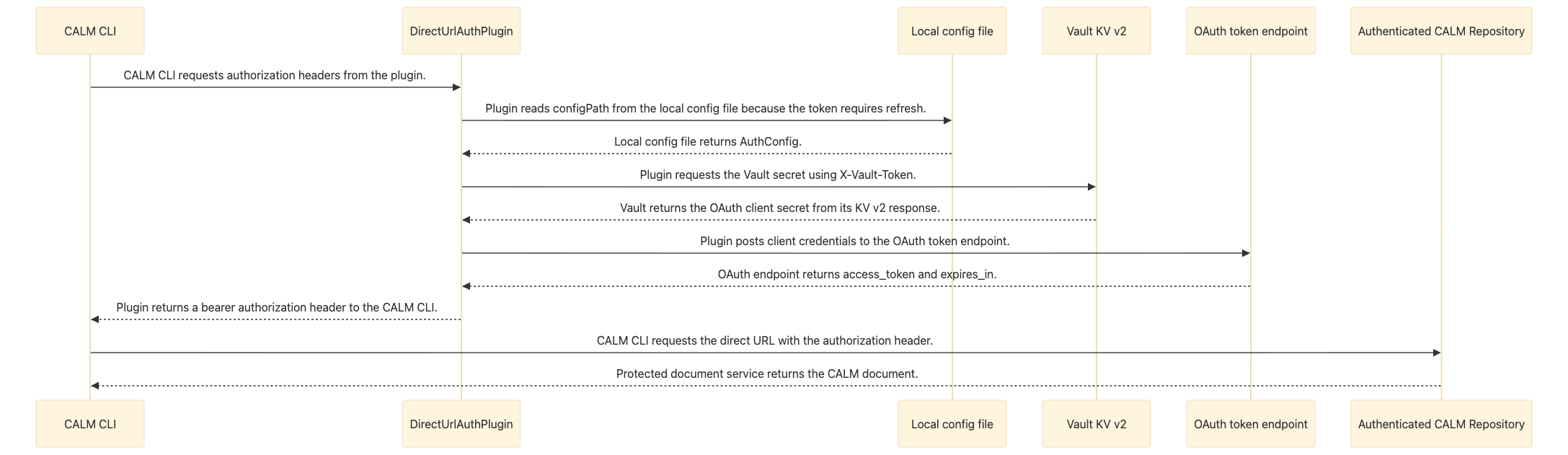
The local configuration file contains the token endpoint, client identifier, Vault endpoint, Vault token, secret path, and optional secret field name. The client secret is retrieved from Vault at runtime instead of being stored in the local configuration file. The module caches both the configuration read and the Vault request so concurrent document requests do not repeat the same work.
The module uses Node's built-in http and https clients for both Vault and token requests. It accepts only HTTP and HTTPS endpoints, sends a GET request for the Vault secret, and sends a form-encoded POST request to the token endpoint. Non-2xx responses, invalid JSON, missing token fields, invalid URLs, and missing configuration values cause the module to reject with an error.
The CLI invokes the module only for hosts listed in directUrlAuthAuthenticatedHosts. The module is responsible for obtaining the credentials and returning headers; the CLI remains responsible for deciding which direct URLs are eligible for authentication and attaching the returned headers to the document request.
Directory structure
Assuming the following directory structure and configuration files with the following TypeScript source code is in the src/ directory:
direct-url-auth-plugin/
├── package.json
├── tsconfig.json
└── src/
|   └── direct-url-auth-plugin.ts
└── dist/  (location for the built directUrlAuth plugin Javascript module)
Direct URL Authentication Plugin
If the end user organization writes the plugin in TypeScript,it must be compiled to JavaScript because the plugin module must be a .js file, not TypeScript source directly, because the CLI loads it with dynamic import at runtime.
direct-url-auth-plugin.ts
import * as http from 'node:http';
import * as https from 'node:https';
import { readFile } from 'node:fs/promises';

// Local settings for the token endpoint and the Vault location of the client secret.
type AuthConfig = {
    tokenUrl: string;
    clientId: string;
    vaultUrl: string;
    vaultToken: string;
    vaultSecretPath: string;
    vaultSecretField?: string;
};

// The token service returns the access token and its lifetime in seconds.
type TokenResponse = {
    access_token?: string;
    expires_in?: number;
};

// This matches the nested data shape returned by a Vault KV v2 secret request.
type VaultSecretResponse = {
    data?: {
        data?: Record<string, unknown>;
    };
};

// The plugin keeps the token and its expiry time to avoid unnecessary token requests.
type CachedToken = {
    accessToken: string;
    expiresAtEpochMs: number;
};


// Normalize unknown thrown values so request errors can include a readable message.
function getErrorMessage(error: unknown): string {
    return error instanceof Error ? error.message : String(error);
}

// Supplies bearer headers for protected direct URL requests made by CALM.
export default class DirectUrlAuthPlugin {
    private readonly configPath: string;
    private configPromise?: Promise<AuthConfig>;
    private cachedToken?: CachedToken;
    private clientSecretPromise?: Promise<string>;

    constructor(configPath?: string) {
        // The CLI passes directUrlAuthConfigPath here when it instantiates the module.
        if (!configPath) {
            throw new Error('Direct URL auth configPath is required');
        }

        this.configPath = configPath;
    }

    async getAuthHeaders(url: string, _requestBody: unknown): Promise<Record<string, string>> {
        // CALM calls this method before fetching a protected direct URL.
        return {
            Authorization: `Bearer ${await this.getAccessToken()}`
        };
    }

    private async getAccessToken(): Promise<string> {
        // Reuse a valid token so each document request does not require a new token request.
        if (this.cachedToken && Date.now() < this.cachedToken.expiresAtEpochMs - 60_000) {
            return this.cachedToken.accessToken;
        }

        const config = await this.getConfig();
        const body = new URLSearchParams();
        body.set('client_id', config.clientId);
        body.set('client_secret', await this.getClientSecret(config));
        body.set('grant_type', 'client_credentials');

        const tokenResponse = await this.requestToken(config, body);

        if (!tokenResponse.access_token) {
            throw new Error(`Direct URL auth token response from ${config.tokenUrl} did not include access_token`);
        }

        const expiresInSeconds = tokenResponse.expires_in ?? 300;
        this.cachedToken = {
            accessToken: tokenResponse.access_token,
            expiresAtEpochMs: Date.now() + (expiresInSeconds * 1000)
        };

        return this.cachedToken.accessToken;
    }

    private async getConfig(): Promise<AuthConfig> {
        // Cache the in-flight load so concurrent requests share one config read.
        if (!this.configPromise) {
            this.configPromise = this.loadConfig(this.configPath);
        }

        return this.configPromise;
    }

    private async getClientSecret(config: AuthConfig): Promise<string> {
        // Cache the in-flight Vault request and keep the secret out of the auth config file.
        if (!this.clientSecretPromise) {
            this.clientSecretPromise = this.loadClientSecret(config);
        }

        return this.clientSecretPromise;
    }

    private async loadConfig(configPath: string): Promise<AuthConfig> {
        // This file contains endpoints and lookup metadata, not the client secret itself.
        let text: string;
        try {
            text = await readFile(configPath, 'utf8');
        } catch (error) {
            throw new Error(`Failed to read direct URL auth config at ${configPath}: ${getErrorMessage(error)}`);
        }

        let config: AuthConfig;
        try {
            config = JSON.parse(text) as AuthConfig;
        } catch (error) {
            throw new Error(`Failed to parse direct URL auth config at ${configPath}: ${getErrorMessage(error)}`);
        }

        if (!config.tokenUrl || !config.clientId || !config.vaultUrl || !config.vaultToken || !config.vaultSecretPath) {
            throw new Error(
                `Direct URL auth config at ${configPath} must include tokenUrl, clientId, vaultUrl, vaultToken, and vaultSecretPath`
            );
        }

        return config;
    }

    private async loadClientSecret(config: AuthConfig): Promise<string> {
        const fieldName = config.vaultSecretField ?? 'clientSecret';
        // Read the client secret from Vault only when the token request needs it.
        const vaultResponse = await this.requestVaultSecret(config);
        const secretValue = vaultResponse.data?.data?.[fieldName];

        if (typeof secretValue !== 'string' || !secretValue) {
            throw new Error(
                `Vault secret at ${config.vaultSecretPath} did not include string field '${fieldName}'`
            );
        }

        return secretValue;
    }

    private getEndpoint(urlText: string, label: string): URL {
        try {
            return new URL(urlText);
        } catch (error) {
            throw new Error(`Invalid direct URL auth ${label} '${urlText}': ${getErrorMessage(error)}`);
        }
    }

    private async requestVaultSecret(config: AuthConfig): Promise<VaultSecretResponse> {
        const vaultBaseUrl = this.getEndpoint(config.vaultUrl, 'vaultUrl');
        const vaultUrl = new URL(`/v1/${config.vaultSecretPath.replace(/^\/+/, '')}`, vaultBaseUrl);

        return await this.requestJson<VaultSecretResponse>(
            vaultUrl,
            {
                accept: 'application/json',
                'x-vault-token': config.vaultToken,
            },
            `Vault secret request to ${vaultUrl.toString()}`
        );
    }

    private async requestToken(config: AuthConfig, body: URLSearchParams): Promise<TokenResponse> {
        const tokenUrl = this.getEndpoint(config.tokenUrl, 'tokenUrl');
        const requestBody = body.toString();

        return await this.requestJson<TokenResponse>(
            tokenUrl,
            {
                accept: 'application/json',
                'content-type': 'application/x-www-form-urlencoded',
                'content-length': Buffer.byteLength(requestBody).toString(),
            },
            `Direct URL auth token request to ${config.tokenUrl}`,
            requestBody
        );
    }

    private async requestJson<T>(
        endpoint: URL,
        headers: Record<string, string>,
        description: string,
        requestBody?: string
    ): Promise<T> {
        // Use Node's HTTP clients so the example has no external runtime dependency.
        const transport = endpoint.protocol === 'https:' ? https : endpoint.protocol === 'http:' ? http : undefined;

        if (!transport) {
            throw new Error(`${description} failed: unsupported protocol ${endpoint.protocol}`);
        }

        return await new Promise<T>((resolvePromise, rejectPromise) => {
            const request = transport.request(endpoint, {
                method: requestBody ? 'POST' : 'GET',
                headers,
            }, (response) => {
                let responseBody = '';
                response.setEncoding('utf8');
                response.on('data', (chunk: string) => {
                    responseBody += chunk;
                });
                response.on('end', () => {
                    // Treat non-2xx responses as failures before attempting to parse the body.
                    if (!response.statusCode || response.statusCode < 200 || response.statusCode >= 300) {
                        rejectPromise(
                            new Error(`${description} failed: ${response.statusCode ?? 'unknown'} ${response.statusMessage ?? ''}`.trim())
                        );
                        return;
                    }

                    try {
                        resolvePromise(JSON.parse(responseBody) as T);
                    } catch (error) {
                        rejectPromise(new Error(`${description} failed: response was not valid JSON: ${getErrorMessage(error)}`));
                    }
                });
            });

            request.on('error', (error) => {
                rejectPromise(new Error(`${description} failed: ${error.message}`));
            });

            if (requestBody) {
                request.write(requestBody);
            }
            request.end();
        });
    }
}
Configuration Files
package.json
{
  "name": "direct-url-auth-plugin",
  "private": true,
  "type": "module",
  "scripts": {
        "build": "tsc -p tsconfig.json"
  },
  "devDependencies": {
    "@types/node": "^26.0.0",
    "typescript": "^5.9.2"
  }
}
tsconfig.json
{
  "compilerOptions": {
    "target": "ES2022",
    "module": "NodeNext",
    "moduleResolution": "NodeNext",
    "rootDir": "src",
    "outDir": "dist",
    "types": [
      "node"
    ],
    "strict": true
  },
  "include": [
    "src/**/*.ts"
  ]
}
Build the javascript module
Example command to build the javascript module
npm install

npm run build
Illustrative directUrlAuth configuration
~/.calm.json
{
  "directUrlAuthModule": "/path/to/direct-url-auth-plugin/dist/direct-url-auth-plugin.js",
  "directUrlAuthConfigPath": "/path/to/direct-url-auth-plugin/direct-url-auth.config.json",
  "directUrlAuthAuthenticatedHosts": [
    "internal-calm.example.org"
  ]

}
Or the equivalent environment-variable configuration is:
export CALM_DIRECT_URL_AUTH_MODULE="/path/to/direct-url-auth-plugin/dist/direct-url-auth-plugin.js"
export CALM_DIRECT_URL_AUTH_CONFIG_PATH="/path/to/direct-url-auth-plugin/direct-url-auth.config.json"
export CALM_DIRECT_URL_AUTH_AUTHENTICATED_HOSTS="internal-calm.example.org"
Environment variables have precedence over configuration file parameters in ~/.calm.json.
Multiple authenticated hosts must be separated by commas:
export CALM_DIRECT_URL_AUTH_AUTHENTICATED_HOSTS="schemas.example.com,documents.example.org"